
Go Pyesta QRPh Deposit: Your Complete Step-by-Step Guide
A Go Pyesta QRPh deposit lets you fund your account using almost any supported banking or e-wallet app you already have, without needing GCash or Maya specifically. Since QRPh works as a shared national standard across multiple banks and wallets, players get to use whichever app is already on their phone.
This guide covers what makes QRPh different, which apps support it, and the full step-by-step process for depositing through it.
What Is QRPh, and Why It’s Different From GCash or Maya
QRPh is a national QR code standard developed under the Bangko Sentral ng Pilipinas (BSP)‘s payment system initiatives, designed to let different banks and e-wallets read and process the same QR code format. Unlike GCash or Maya, which are specific apps tied to their own platforms, QRPh isn’t an app at all — it’s a shared standard that multiple providers support.
This means a single QRPh code generated on Go Pyesta can be scanned and paid using whichever supported banking or e-wallet app a player already has, without needing to download or register for a new one. For players who don’t use GCash or Maya, or who simply prefer their existing bank app, QRPh removes the need to set up an additional payment method just to deposit.
Which Banks and E-Wallets Support QRPh Deposits
Since QRPh is a shared national standard, it’s supported by a wide range of banks and e-wallets across the Philippines. Commonly supported apps include:
| Category | Examples |
| Banks | BPI, BDO, Metrobank, UnionBank, Landbank, China Bank |
| E-Wallets | GCash, Maya, GrabPay |
This list can vary depending on each provider’s own QRPh integration, so it’s worth checking within your specific app to confirm QRPh support before depositing. As long as your app supports scanning or uploading a QRPh code, it can be used to complete a deposit — just one of several ways to fund your account.
How to Complete a Go Pyesta QRPh Deposit
Before you begin, make sure you’re logged in to your Go Pyesta account and have a QRPh-supported banking or e-wallet app ready on your device.
Step 1: Open the Deposit Page
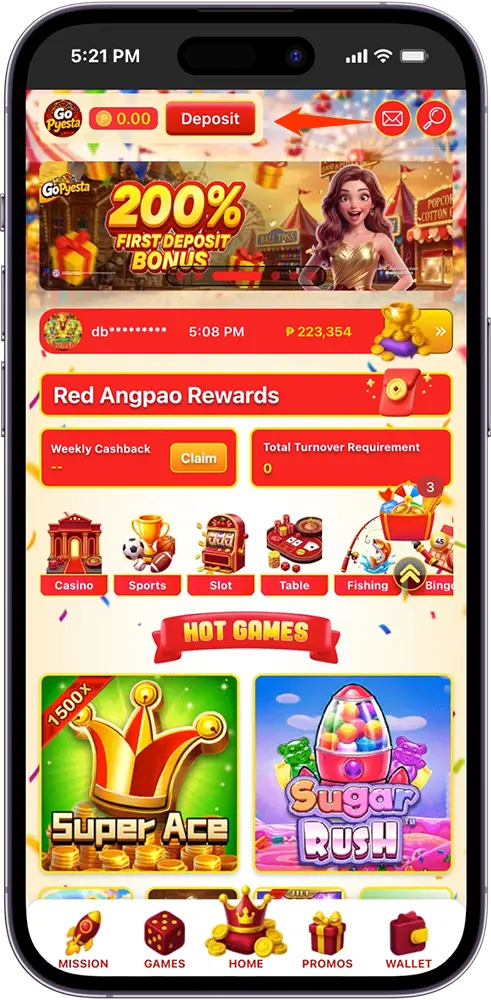
From your account dashboard, tap Deposit at the top of the screen, or select Wallet from the bottom navigation menu.
Step 2: Select QRPh as Your Payment Method
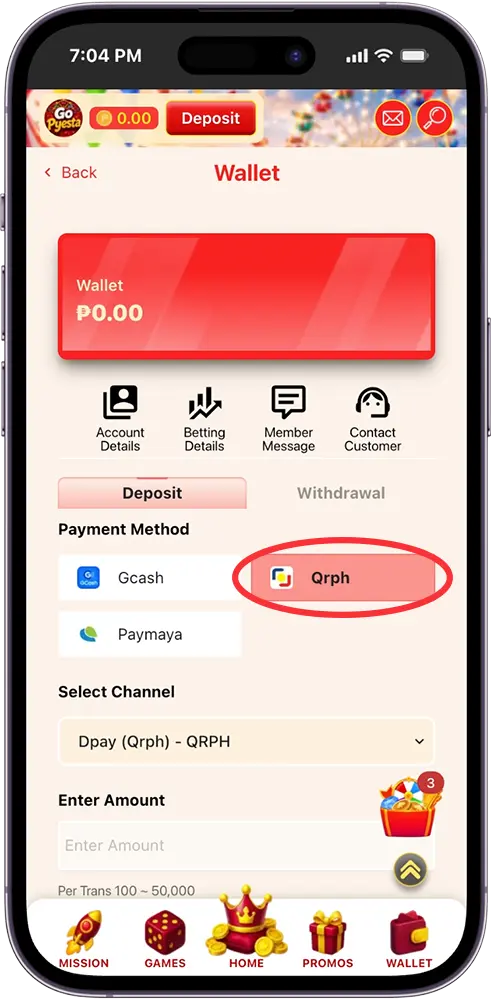
Under Payment Method, choose QRPh from the available options.
Step 3: Enter Your Deposit Amount
Type in your desired amount, or select one of the quick-amount buttons provided. Each transaction accepts a minimum of ₱100 and a maximum of ₱50,000.
Step 4: Apply a Promotion (Optional)
If you have an eligible promotion, select it from the Promotions dropdown before proceeding.
Step 5: Confirm and Proceed
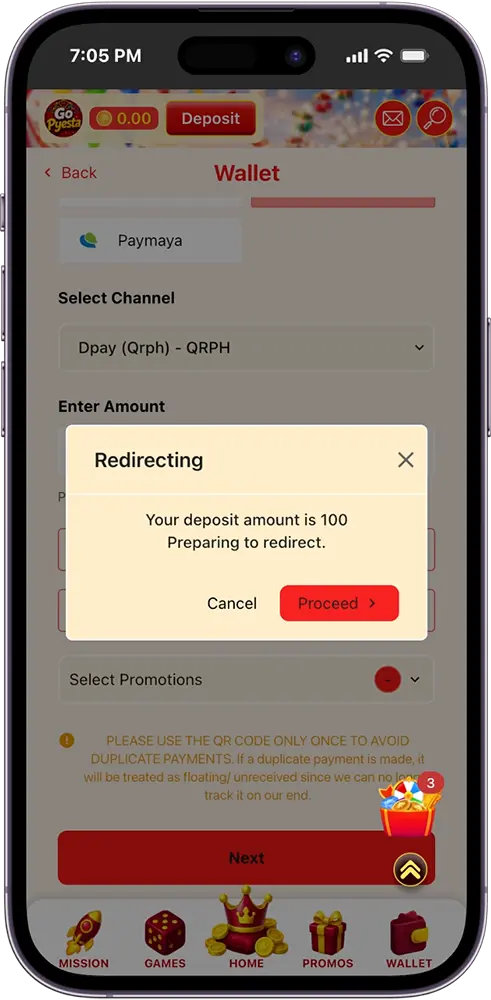
Tap Next, review your deposit amount in the confirmation pop-up, then tap Proceed.
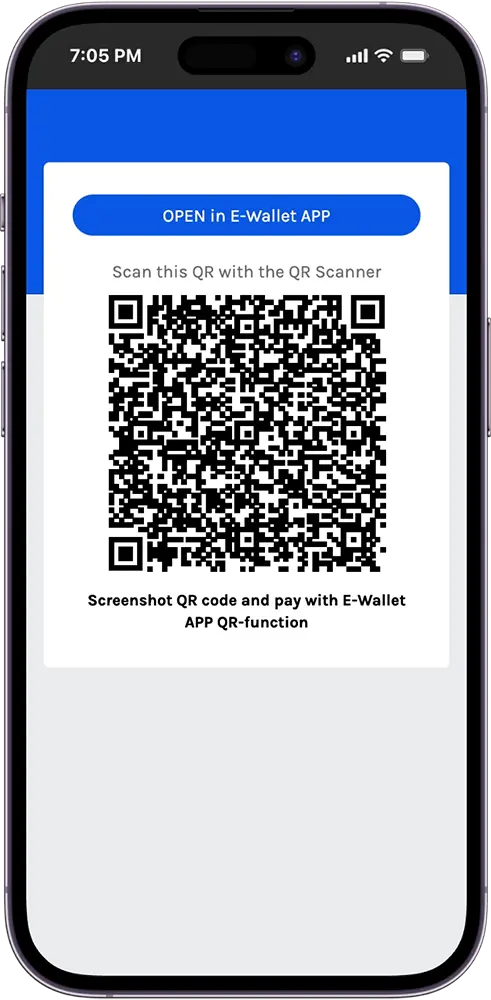
Step 6: Scan or Screenshot the QR Code
A QR Ph code will be generated. Scan it directly using your banking or e-wallet app’s QR scanner, or screenshot the code and upload it through your app’s QR-pay function.
Step 7: Complete Payment Through Your Chosen App
Since QRPh works across multiple supported banks and e-wallets, you can complete the payment through whichever app you have on hand, without needing to select a specific channel beforehand.
Step 8: Wait for Balance Confirmation
Once your payment is confirmed, your wallet balance updates automatically.
Note: Use the QR code only once per transaction. Reusing it for another payment may result in a duplicate charge that can’t be tracked or matched to your account.
Go Pyesta QRPh Deposit Limits and Processing Time
Each QRPh deposit transaction accepts a minimum of ₱100 and a maximum of ₱50,000. For larger amounts, multiple transactions can be completed within the same day.
Processing speed can vary slightly depending on which banking or e-wallet app is used to scan and pay, though most QRPh deposits reflect in your balance within a few minutes. Since QRPh transactions are processed instantly on the payment provider’s end in most cases, delays are typically brief when they do occur.
Common Go Pyesta QRPh Deposit Issues and How to Fix Them
QR Code Not Scanning
Make sure your banking or e-wallet app’s QR scanner has a clear, well-lit view of the code. If scanning still doesn’t work, try the screenshot-and-upload method instead.
App Doesn’t Support QRPh
Not all apps have QRPh fully enabled. If your app doesn’t recognize the code, try a different supported bank or e-wallet app instead.
Balance Not Reflecting
Wait a few minutes after completing payment before checking again. If it still hasn’t updated after some time, confirm that the transaction was successfully completed on your banking or e-wallet app’s end.
QR Code Expired
QRPh codes are generated per transaction and may expire after a short period. If this happens, return to the deposit page and generate a new one.
Duplicate Payment from Reused QR Code
Each QR code is meant for a single transaction. Reusing one for a second payment can result in funds that can’t be tracked or matched to your account, so always generate a fresh code for each deposit.

One Code, Any App!
Whichever bank or e-wallet you already trust, QRPh lets you use it to fund your account without switching apps or setting up something new. Scan, confirm, and you’re ready to play.
Frequently Asked Questions (FAQs)
Is there a fee for a Go Pyesta QRPh deposit?
We don’t charge a deposit fee on our end. Your bank or e-wallet provider may apply its own standard transaction fees, so it’s worth checking within your specific app for any applicable charges.
Do I need GCash or Maya to use QRPh, or will any supported app work?
Any QRPh-supported banking or e-wallet app will work. You don’t need GCash or Maya specifically — as long as your app has QRPh enabled, it can be used to complete the deposit.
Is QRPh as safe as depositing through GCash or Maya directly?
Yes. QRPh follows the same BSP-regulated payment standards used across supported banks and e-wallets, so the transaction is processed with the same level of security regardless of which app you use.
Can I use QRPh if I don’t have an e-wallet at all?
Yes, as long as your bank’s mobile app supports QRPh. Many major Philippine banks offer this feature alongside e-wallets, so an e-wallet account isn’t a requirement.
What happens if my banking app doesn’t recognize the QR code?
This usually means QRPh isn’t fully supported or enabled in that specific app. Try scanning with a different supported bank or e-wallet app instead.
Every Day is a Winning Fiesta
Join Go Pyesta and explore casino entertainment, sports betting, slots and promotions — all in one place.