
Go Pyesta Maya Deposit — As Easy as Logging In

Go Pyesta Maya deposit works the same way many Filipinos already use Maya day to day — logging in, confirming a transaction, and moving on with their day. If Maya is already part of your regular banking habits, funding your Go Pyesta account through it feels less like a separate task and more like something you’re already used to doing.
This guide covers why Maya works well as a deposit method, the full step-by-step process, and what to expect in terms of limits and processing time.
Maya: More Than an E-Wallet, Part of Everyday Filipino Banking
For a lot of Filipinos, Maya isn’t just an app for sending money — it’s become part of how they manage everyday finances. Beyond transfers, Maya offers a savings account with interest, bill payment features, load purchases, and a Visa card that works both online and in physical stores. It also operates as a BSP-regulated digital bank, not just a payment app.
That familiarity carries over naturally when it’s time to fund your account. Instead of learning a new platform or setting up a separate payment method, depositing through Maya becomes just another everyday transaction, alongside the bill payments and savings habits players may already have running in the background.
How to Complete a Go Pyesta Maya Deposit
Before you begin, make sure you have an active Maya account with sufficient balance and that you’re logged in to your Go Pyesta account.
Step 1: Open the Deposit Page
From your account dashboard, tap Deposit at the top of the screen, or select Wallet from the bottom navigation menu.

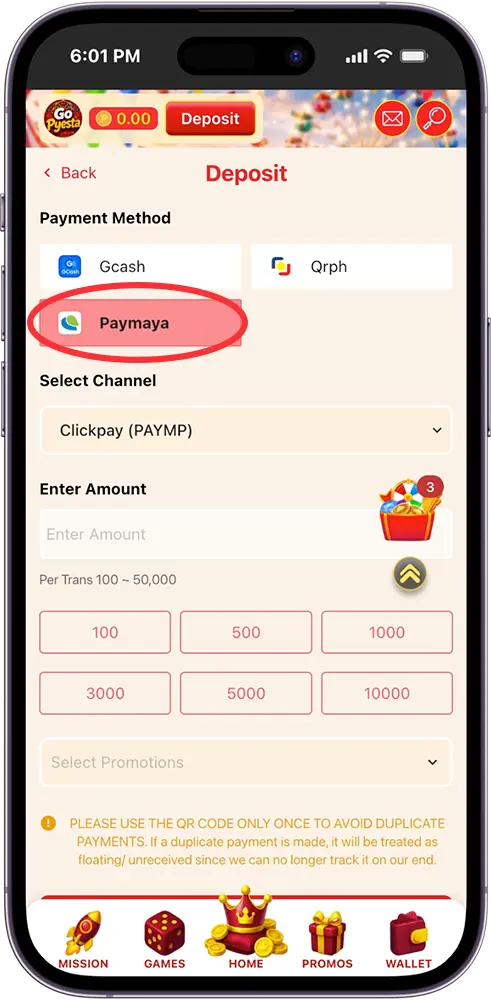
Step 2: Select Maya as Your Payment Method
Under Payment Method, choose Paymaya from the available options.
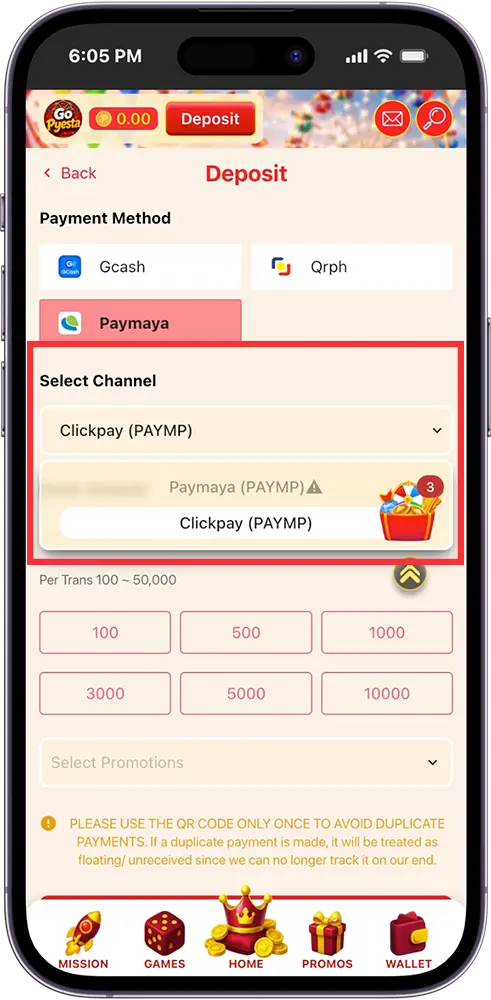
Step 3: Choose Your Preferred Channel
If more than one Maya channel is available, select your preferred option from the dropdown menu.
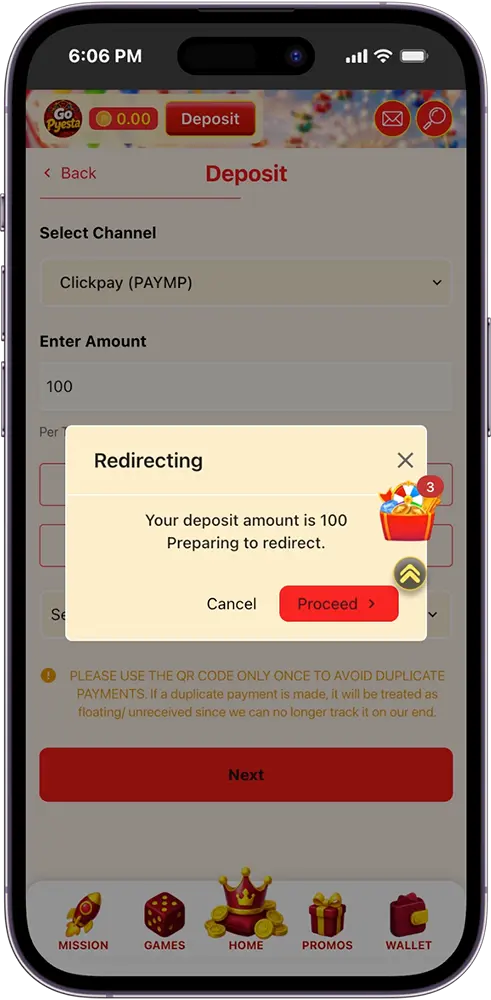
Step 4: Enter Your Deposit Amount
Type in your desired amount, or select one of the quick-amount buttons provided. Each transaction accepts a minimum of ₱100 and a maximum of ₱50,000.
Step 5: Apply a Promotion (Optional)
If you have an eligible promotion, select it from the Promotions dropdown before proceeding.
Step 6: Confirm and Proceed
Tap Next to continue to the payment page.
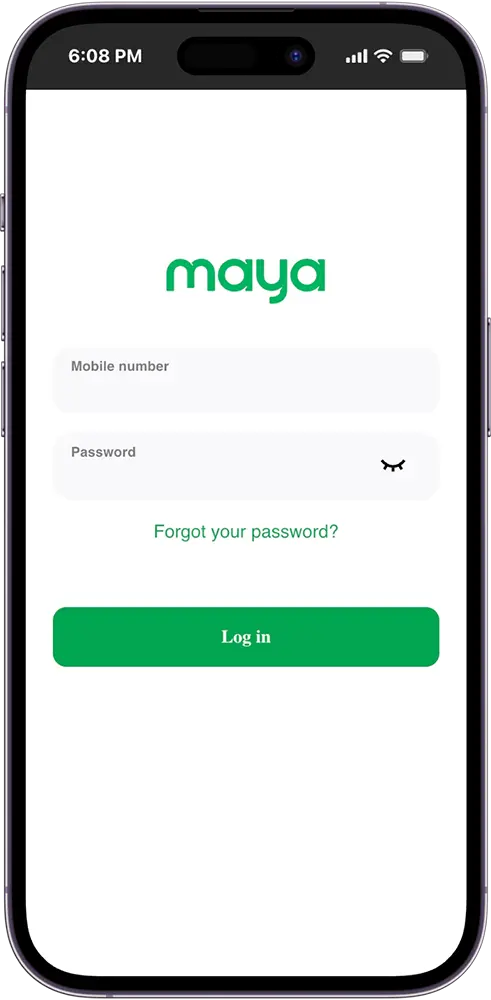
Step 7: Log In to Your Maya Account
Enter your registered Maya mobile number and password, then tap Log In to proceed.
Step 8: Complete the Payment
Follow the on-screen instructions within Maya to confirm your transaction.
Step 9: Wait for Balance Confirmation
Once your payment is confirmed, your Go Pyesta wallet balance updates automatically.
Note: Use the QR code only once per transaction, if provided. Reusing it for another payment may result in a duplicate charge that can’t be tracked or matched to your account.
Go Pyesta Maya Deposit Limits and Processing Time
Each Maya deposit transaction accepts a minimum of ₱100 and a maximum of ₱50,000. For larger amounts, multiple transactions can be completed within the same day.
Processing is typically fast, with most deposits reflecting in your balance within a few minutes of logging in and confirming payment through Maya. As with any digital transaction, occasional delays can happen, but these are usually a matter of waiting slightly longer rather than a sign that something went wrong.
Common Go Pyesta Maya Deposit Issues and How to Fix Them
Unable to Log In to Maya
Double-check your registered mobile number and password. If you’ve forgotten your password, use Maya’s account recovery option before attempting your deposit again.
Balance Not Reflecting
Wait a few minutes after completing payment before checking again. If it still hasn’t updated after some time, confirm that the transaction was successfully completed on the Maya side.
Incorrect Amount Entered
Double-check your entered amount before tapping Next. Transactions outside the ₱100–₱50,000 range won’t be processed.
Session Timed Out During Login
If you take too long to enter your Maya credentials, the payment session may expire. Simply return to the deposit page and start the transaction again.
Payment Method Unavailable
If Maya isn’t showing as an option, try refreshing the page or checking again after a few minutes, as this is usually temporary.

Deposit Like You Always Do
If Maya is already part of your everyday routine, funding your account is one more thing it handles well. Log in, confirm, and you’re ready to play, no new habits required.
Frequently Asked Questions (FAQs)
Is there a fee for a Go Pyesta Maya deposit?
We don’t charge a deposit fee on our end. Maya may apply its own standard transaction fees depending on your account type or the payment channel used, so it’s worth checking your Maya app for any applicable charges.
Do I need a verified Maya account to deposit?
A verified Maya account is recommended, as it typically comes with higher transaction limits and access to the full range of Maya’s banking features, helping your deposit go through without issues.
Can I deposit using my Maya balance directly?
Yes. Deposits are made using your available Maya balance. If your balance is insufficient, you’ll need to cash in to your Maya account first through your preferred Maya-supported channel before completing your deposit.
Is it safe to log in to Maya through the Go Pyesta deposit page?
Yes. You’re redirected to Maya’s own secure login page to complete the transaction, and your Maya credentials are never shared directly with our platform.
Can I cancel a Maya deposit after logging in and confirming?
Once a payment has been completed through Maya, it generally can’t be canceled or reversed. Always review your amount carefully before confirming the transaction.
Every Day is a Winning Fiesta
Join Go Pyesta and explore casino entertainment, sports betting, slots and promotions — all in one place.